



 Import SkyWalking Data
This document was translated by ChatGPT
#1. Data Flow
#1.1 DeepFlow Community Edition
#1.2 DeepFlow Enterprise Edition
#2. Trace Collection
#2.1 Collecting via DeepFlow Agent
Starting from DeepFlow Enterprise Edition v6.6, DeepFlow Agent supports directly receiving and sending SkyWalking data without additional configuration.
#2.2 Collecting via OpenTelemetry Collector
#2.2.1 Background Knowledge
You can refer to the OpenTelemetry documentation (opens new window) to learn more about OpenTelemetry, and follow the OpenTelemetry Installation section in the previous chapter to quickly install OpenTelemetry.
You can refer to the SkyWalking documentation (opens new window) to learn more about SkyWalking. For this demo, you do not need to install the full SkyWalking stack — we will use OpenTelemetry to integrate SkyWalking trace data.
#2.2.2 Confirm OpenTelemetry Version
First, you need to enable OpenTelemetry’s ability to receive SkyWalking data, process it using the OpenTelemetry standard protocol, and then send it to the DeepFlow Agent.
There is a bug in OpenTelemetry’s SkyWalking data receiver, which we have recently fixed in PRs #11562 (opens new window) and #12651 (opens new window). For the following demo, we require the OpenTelemetry Collector image (opens new window) version >= 0.57.0. Please check the otel-agent image version in your environment and ensure it meets the requirement. You can refer to the OpenTelemetry Installation section in the previous chapter to update the otel-agent version in your environment.
#2.2.3 Configure OpenTelemetry to Receive SkyWalking Data
As described in the Background Knowledge section, after installing OpenTelemetry, you can configure it to receive SkyWalking data using the following steps:
Assume the namespace for OpenTelemetry is open-telemetry, and the ConfigMap used by otel-agent is named otel-agent-conf. Modify the otel-agent configuration with the following command:
kubectl -n open-telemetry edit cm otel-agent-conf
In the receivers section, add the following:
receivers:
  # add the following config
  skywalking:
    protocols:
      grpc:
        endpoint: 0.0.0.0:11800
      http:
        endpoint: 0.0.0.0:12800
2
3
4
5
6
7
8
In the service.pipelines.traces section, add the following:
service:
  pipelines:
    traces:
      # add receiver `skywalking`
      receivers: [skywalking]
2
3
4
5
Also, make sure that otel-agent-conf has been configured according to the Configure otel-agent section.
Next, modify the otel-agent Service to open the corresponding ports:
kubectl -n open-telemetry patch service otel-agent -p '{"spec":{"ports":[{"name":"sw-http","port":12800,"protocol":"TCP","targetPort":12800},{"name":"sw-grpc","port":11800,"protocol":"TCP","targetPort":11800}]}}'
Finally, restart the otel-agent to apply the update:
kubectl rollout restart -n open-telemetry daemonset/otel-agent
#3. Modify SkyWalking Sending Configuration
Finally, check the configured SkyWalking OAP Server (opens new window) address in your application, and change it to the Otel Agent Service address: otel-agent.open-telemetry. For example, change the environment variable SW_AGENT_COLLECTOR_BACKEND_SERVICES=oap-server:11800 to SW_AGENT_COLLECTOR_BACKEND_SERVICES=otel-agent.open-telemetry:11800. If you are using DeepFlow Agent to receive data directly, change it to deepflow-agent.deepflow.
Of course, the reporting address in the application configuration may take various forms. Please modify it according to the actual application startup command. For Java applications, you only need to ensure that the injected address in the startup command is modified, for example: -Dskywalking.collector.backend_service=otel-agent.open-telemetry:11800.
#4. Configure DeepFlow
Please refer to the Configure DeepFlow section to complete the DeepFlow Agent configuration.
#5. Experience with WebShop Demo
#5.1 Deploy the Demo
This demo comes from this GitHub repository (opens new window). It is a WebShop application built with Spring Boot, consisting of five microservices. Its architecture is as follows:
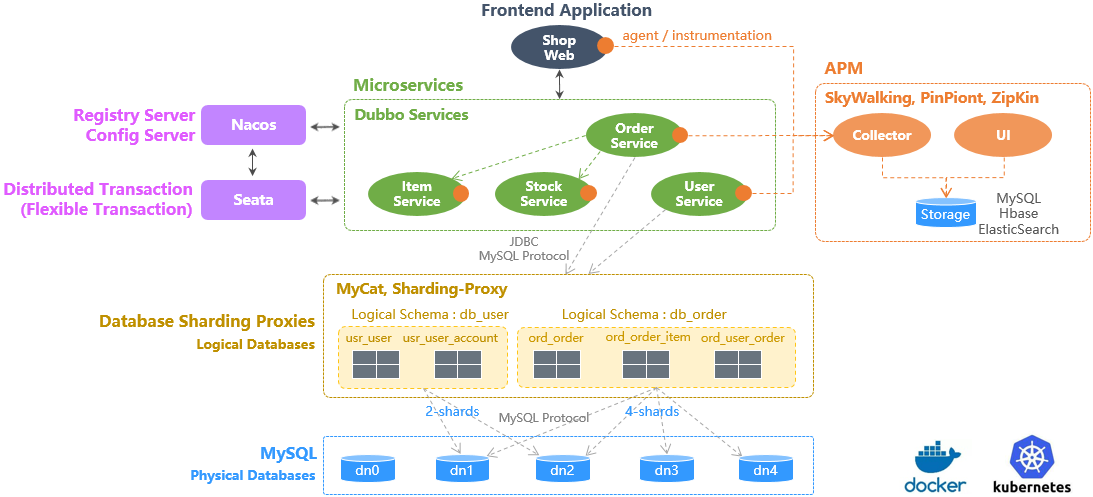
Sping Boot Demo Architecture
You can deploy this demo with a single command. The reporting address has already been configured, so no further modification is needed.
kubectl apply -f https://raw.githubusercontent.com/deepflowio/deepflow-demo/main/DeepFlow-Otel-SkyWalking-Demo/deepflow-otel-skywalking-demo.yaml
#5.2 View Tracing Data
Go to Grafana, open the Distributed Tracing dashboard, select namespace = deepflow-otel-skywalking-demo, and then choose a call to trace.
DeepFlow can correlate and display tracing data from SkyWalking, eBPF, and BPF in a single trace flame graph,
covering the full-stack call path of a Spring Boot application from business code, system functions, to network interfaces, achieving true end-to-end distributed tracing. The result looks like this:

OTel SkyWalking Demo
You can also visit the DeepFlow Online Demo (opens new window) to see the effect.